Mobile Crane Personal Simulator
The Advanced Edition of the Mobile Crane Personal Simulator places trainees behind the controls of a modern rough-terrain crane with a telescoping boom, jib, and multiple hook-block options. This new release adds wind dynamics with customizable direction, strength, and gusting, increasing realism for certification-focused operator training.
Real-time data includes boom angle, length, radius, telescoping status, hoist speed, and Load-Moment Indicator. After mastering basic crane operations, trainees move on to lift planning—interpreting load charts, selecting configurations, and safely executing the plan. Training concludes with signal person instruction, where trainees both give and respond to crane signals.
Compatible with single-screen and triple-screen (landscape or portrait) displays, the simulator also supports a fourth display for signal person training.
Key Features
- Highly realistic simulation graphics and physics
- 14 Simulation Modules of increasing difficulty
- 44 unique Performance Indicators for in-depth skill evaluation
- 5 Fatal Errors to detect unsafe actions
- USB-ready simulator controls, multiple mounting options
- Support for single and multi-monitor configurations
- Standard and Advanced editions for different training objectives
- Wind simulation, boom deflection, swing brake options (Advanced only)
- Switch viewpoints during operation (cabin/external)
- HD instructional videos and e-book companion
Aligned with Industry Certification Standards
The simulation exercises are designed to develop core crane operating skills—navigating obstacles, managing load height constraints, and interpreting load charts—mirroring the challenges found in Practical Exams by organizations like NCCCO and NCCER. With built-in “zigzag” corridor scenarios and diagnostic performance tracking, this simulator helps trainees build the confidence and competence needed to pass certification exams on the first attempt—without the high cost of site preparation or examiner accreditation.
Simulator Controls
Configure your Mobile Crane simulator with tabletop-mounted Replica Controls or the fully immersive Operator Chair. Each option provides flexible setups with joystick or lever-based layouts.
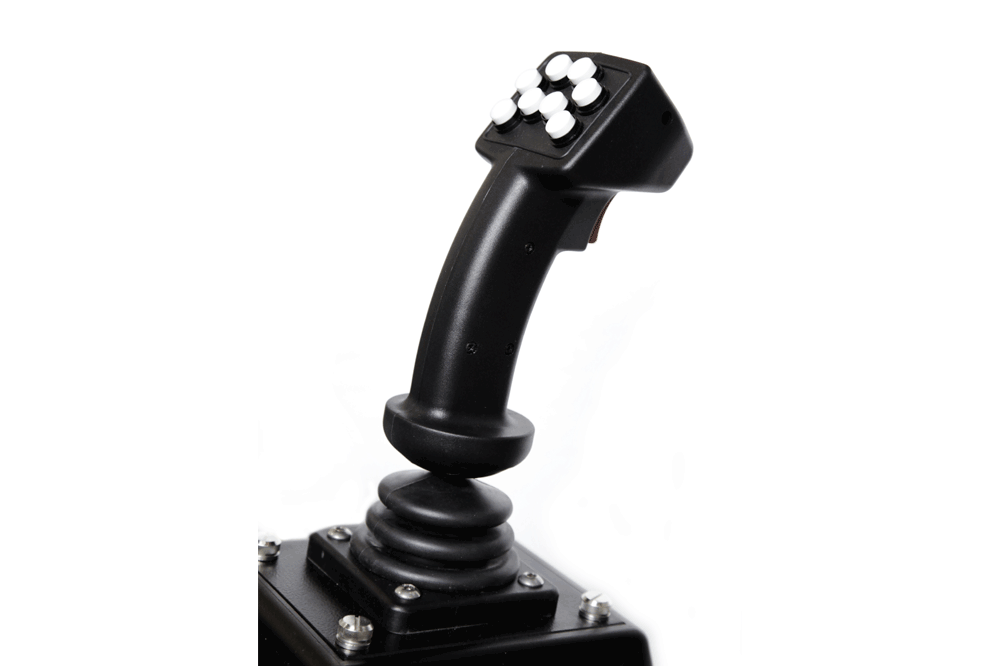
Simlog's Replica Controls for Mobile Crane simulation include either joystick or lever configurations, both USB-ready and compatible with table-top brackets or the Operator Chair.
Joystick-based systems use two USB-ready multipurpose joysticks. Lever-based setups feature four USB-ready levers, mimicking boom trucks and older crane cabins. Mounting brackets allow ergonomic positioning beside a regular chair.
Possible Setups:
Training setups can be customized to meet a variety of space and visual immersion needs. You can opt for a single front-facing display in landscape mode, a triple-screen configuration in portrait mode for greater vertical field of view, or a three-screen portrait setup combined with an additional landscape monitor for signal person communication and oversight. Each layout supports different training goals and user preferences.
Custom Travel Cases for Replica Controls
These durable cases include foam compartments for all controls, a laptop, cables, and accessories, with wheels and a telescoping handle for easy transport.
Key Features
- Protective interior with form-fit cutouts
- Storage for laptop and essential accessories
- Rolling casters and pull-out handle
- Stackable for streamlined storage
Specifications
- Dimensions: 30" L x 24" W x 19" H
- Weight: 50–100 lbs. depending on contents
Simlog’s Operator Chair delivers an immersive training experience that elevates realism and control. It includes a rugged, fully adjustable operator seat with integrated joystick or lever consoles, foot pedals, and a pivoting steering column. The entire setup rests on a heavy-duty mobile platform, ideal for flexible training spaces.
Both joystick and lever options are USB-ready and designed to mirror real crane cab ergonomics. If you already use a Simlog Operator Chair for another simulator, it may be reconfigured with optional components to support the Mobile Crane simulation software.
Three primary configurations are available: a single front-facing display in landscape mode, a triple-portrait setup for expanded vertical visibility, and a triple-portrait plus landscape monitor for the signal person. These options allow maximum immersion and versatility for all training scenarios.
Key Features
- Industrial seat with air suspension, seatbelt, and headrest
- Integrated USB-ready joystick or lever consoles
- Adjustable seat and armrest positions
- Pedals for boom swing or travel functions
- Steel platform with casters for mobility
Specifications
- Overall Dimensions: 60" L x 30" W x 47" H
- Weight: 330 lbs.
- Shipping Dimensions: 67" x 43" x 44"
- Shipping Weight: approx. 550 lbs. (one per skid)
Vibration System
Enhance realism with Simlog’s optional ButtKicker Simulation Kit. Mounted under the seat, this tactile transducer generates vibrations triggered by software audio events (engine start, boom collisions, etc.), making the experience more immersive.
Software Description
This PC-based simulation software runs in English, French, or Spanish and replicates advanced crane operations and certification scenarios. Add a second display for the signal person or toggle viewpoints with keyboard and controls.
Advanced Edition
- Controls Familiarization
- Hookblock Control 1 and 2
- Pole Topping
- Corridor Following 1–4
- Executing Lifts
- Pole Placement
- Concrete Pouring 1 and 2
- Pick, Lift and Place
- Signalling
Standard Edition
- Controls Familiarization
- Hookblock Control 1 and 2
- Pole Topping
- Corridor Following 1 and 2
- Executing Lifts
- Pole Placement
Trainees can freely switch viewpoints during the simulation using the mouse, keyboard, or simulator controls. Camera views include cabin perspectives with tilt, pan, and zoom functions, as well as exterior perspectives to monitor lifts from various angles. These features offer situational awareness and enhance spatial reasoning—critical skills for real-world crane operation. Support for both portrait and landscape display modes is included.
Performance is measured by 44 unique indicators, offering granular feedback beyond pass/fail scores. Trainees are evaluated on timing, load sway, obstacle contact, and safety events.
- Execution time
- Load sway (maximum and average)
- Collision count
- Two-blocking events
- Fatal error detection