The VLS4.75 is a free-standing platform with a materials processing envelope of 24" x 18" x 8.5" or 3,672 in³. The single laser platform supports a 10.6µm CO2 laser source ranging in power from 10 to 75 watts or one 9.3µm CO2 30 watt, 50 watt, or 75 watt laser source.
Simlog Electric Rope Shovel - Single-Pass Digging Module: Fill the dipper by digging at the rock face. The trial ends when there is material in the dipper, the dipper is no longer in contact with the rock face, and the operator activates the horn.
Simlog Electric Rope Shovel - Following Grade Module: make the rightmost dipper tooth follow the line (the cursor changes color as the tooth moves away from the line). The trial ends when the tooth reaches the end of the line, and the operator activates the horn.
Simlog Mobile Crane Personal Simulator's Signaling Module has trainees move a load to a target destination hidden from the view of the crane operator, and so a signal person is required.
The signal person must view the lift using the dedicated signal-person display and provide hand or voice signals to the crane operator to safely move the load into the target (the target changes color as the load gets closer).
Each trial ends when the load is sufficiently well placed (the target will turn green), the speed of the load is sufficiently small, and the crane operator activates the horn. Telescope extend/retract control is disabled for this module.
Advanced Edition features lift planning exercises that require a solid understanding of load charts and Signal Person training, i.e. learning to provide appropriate signals to the crane operator (to complete a lift), while at the same time teaching that crane operator to understand and follow those signals.
Simlog’s Skid Steer Loader Personal Simulator puts students at the controls of a typical skid steer loader equipped with either a bucket (with or without teeth) or forks, at work in a typical construction site. The simulator configuration options include Vertical or Radial lift path types, and two skid steer loader color combinations.
Replica Controls
The most cost-effective option featuring industrial-strength controls.
Key Benefits
- Easy to assemble and USB-ready
- Light weight and portable
- Ability to create your own operator chair
- Multi-Purpose Replica Controls
- Optional Two-Pedal Replica Control Unit
- ISO, H-Pattern, or Standard (with pedals)
Simlog’s Forklift Personal Simulator Version 2 puts trainees at the controls of a typical sit-down, counter-balanced factory forklift with rear-wheel steering. Training scenarios are typical of factories, warehouses, and distribution centers, with various loads and storage arrangements, truck bays for loading and unloading, and a flatbed truck outside.
Simlog’s Replica Controls for the Forklift Personal Simulator are the most cost-effective set-up option and feature industrial strength components suitable for table-top mounting and Simlog’s Operator Chair. If you are a Simlog customer, you may be able to re-use the Replica Controls that you already have.
You will need three or four USB-ready Forklift Levers. (The fourth lever controls the separation of the forks, so if you use three levers instead of four, the simulation software will change the separation of the forks for you.) Simlog’s table-top mounting brackets will bring the joysticks down from table-top height to the sides of an ordinary chair, to better mimic the positioning of real controls in the cabin of real heavy equipment.
To complete the Replica Controls, add the Logitech “G920 Driving Force Racing Wheel” consisting of a steering wheel and a three-pedal unit, and the “G920 Driving Force Shifter,” a gear shifter that can also be used with many other Personal Simulators. In most countries, the G920 is for sale in retail stores that sell computers or video games, but it may also be purchased from Logitech’s online store. Logitech’s previous version, the “G27 Racing Wheel” can still be used.
Key Benefits:
- Easy to assemble USB controls
- Lightweight and portable
- Ability to create your own operator chair
- 3 or 4-lever configurations available
Possible Setups
There are four commonly used arrangements, one with a single display in front, one with a first display in front and a second display in back (to teach people to turn their heads to look behind when backing up), one with three displays in front arranged side-by-side in portrait mode and one with three displays in front and a fourth display in back.
Custom Travel Cases for Replica Controls
For all setups, Simlog’s Custom Travel Case makes transportation easy.
Key Features
- Made-to-measure, with dedicated slots for levers, joysticks, pedals, steering wheel, and table-top mounting brackets
- Space for a laptop PC, cables, and documentation
- Pull-out handle, with multiple positions
- Wheels (casters)
- Cases are “stackable,” for easy transport.
Specifications
- Overall dimensions: 30″ x 24″ x 19″
- Approximate weight: 50 lbs. when empty, up to 100 lbs. when full (depending upon the Replica Controls.)
Simlog's Hydraulic Excavator Personal Simulator puts trainees at the controls of a modern Hydraulic Excavator in interaction with an articulated dump truck. Using life-like dynamic terrain combined with our intelligent instructional design, your trainees are guided through a series of 12 skill-building Simulation Modules.
Simlog's Hydraulic Excavator Personal Simulator puts trainees at the controls of a modern Hydraulic Excavator in interaction with an articulated dump truck. Using life-like dynamic terrain combined with our intelligent instructional design, your trainees are guided through a series of 12 skill-building Simulation Modules.
Simlog’s new Backhoe Loader Personal Simulator puts you at the controls of a backhoe loader at work in a typical construction site. Both SAE and ISO joystick patterns are available, and changing the point of view during the simulation is easy with joystick buttons, keyboard function keys and mouse controls.
Nine Simulation Modules of increasing level of difficulty begin by teaching basic skills and coordination in early exercises such as “Bucket Positioning” and “Stockpiling”. Later Simulation Modules culminate skills training with exercises such as exposing buried utilities with the backhoe bucket on "Buried Utilities - Perpendicular Excavation."
Simlog’s Wheel Loader Personal Simulator Version 2 puts you at the controls of a modern wheel loader equipped with either a bucket or forks, at work in a typical construction site with a dump truck or flatbed truck.
Simlog’s Wheel Loader Personal Simulator Version 2 puts you at the controls of a modern wheel loader equipped with either a bucket or forks, at work in a typical construction site with a dump truck or flatbed truck.
Pages
-
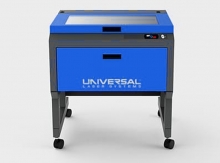 Item Number:VLS4.75
 -
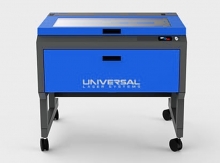 Item Number:VLS6.75The VLS6.75 is a free-standing platform with a material processing envelope of 32" x 18" x 8.5" or 4,896 in³. The single laser platform supports a 10.6µm CO2 laser source ranging in power from 10 to 75 watts or one 9.3µm CO2 30 watt, 50 watt, or 75 watt laser source.
 -
 VRNA offers a fully immersive VR experience designed to enhance the efficiency and reduce the expenses associated with teaching patient care job skills typically conducted in a laboratory environment, including Certified Nursing Assistant (CNA) and Emergency Medical Services (EMS) modules.
 -
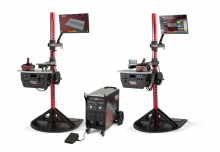 The VRTEX systems are virtual reality arc welding training simulators. These computer-based training systems are educational tools designed to supplement and enhance traditional welding training. They allow students to practice their welding technique in a simulated and immersive environment. The VRTEX systems promote the efficient transfer of quality welding skills and body positioning to the welding booth while reducing material waste associated with traditional welding training.
 -
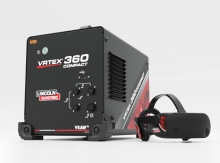 Item Number:K4914-20Lincoln Electric's VRTEX® 360 Compact is a small, portable Virtual Reality Welding Simulator for mobile use in multiple environments.
 -
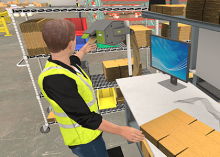 Effective packing surpasses mere item placement; it encompasses product safety, reduced shipping expenses, and the cultivation of brand loyalty. Inadequate packing practices can result in damaged goods, escalated expenses, and pose potential risks for both employees and recipients. This VR course directly confronts and addresses these challenges.
 -
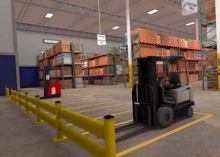 The primary goal of this course is to teach you safe work procedures to follow in a warehouse environment. You will learn how to maintain a safe warehouse and identify common hazards. The Warehouse Hazard awareness simulation is ideal for employees or supervisors who will work in or visit warehouses.
 -
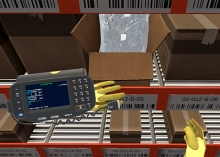 Discover the pivotal final steps of warehouse picking through VR Hard Hat's immersive Back-End Labeling course. Ensure product readiness, accurate shipment identification, and end-to-end traceability. Our course emphasizes precision in back-end labeling, minimizing logistical hurdles for efficient operations.
 -
 VR Hard Hat's Warehouse Picking: Case virtual reality course is meticulously designed to provide insights into the best practices of case picking, ensuring both speed and precision.
 -
 Front-end labeling, a vital component of the picking process, ensures that products are correctly identified, tracked, and dispatched. Proper labeling can reduce errors, improve efficiency, and enhance customer satisfaction. Hard Hat VR's course is designed to address the nuances of labeling at the initial stages of the picking process, ensuring that errors are minimized and efficiency is maximized.